Samsung Smart TV Review

For this blogs review, I decided to focus on a bigger scale item, the behemoth electrical appliance in any home, the TV. This review is just of the TV I use in my bedroom, and it is very special to me, as this used to be my living room TV until it broke forcing my dad to buy a new one. Before disposing of the TV I did some research and discovered that I easily could repair it myself for around $100, so I did. Long story short I now have a TV in my room that is way to big for my small room, but I’m not complaining.  I would give this TV a 5/5 just for giving me a good story and being very convenient for digesting media. I decided to link a video review for this blog that essentially sums up my thoughts, and to reduce the reading for you today.


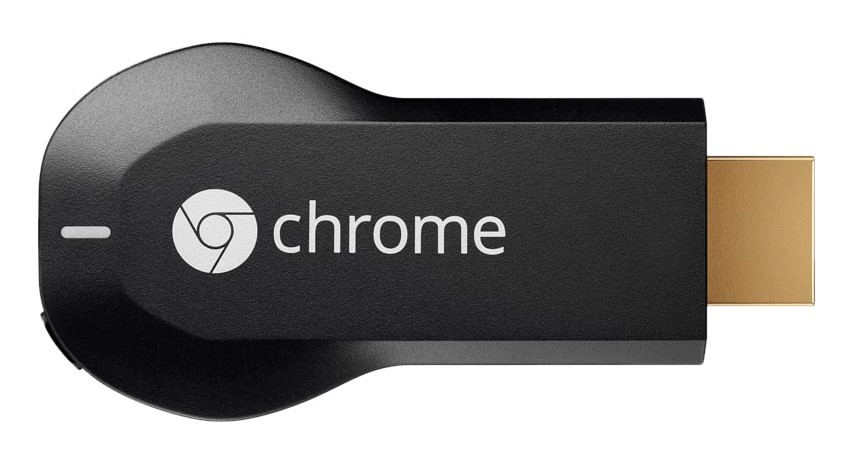
Google Chromecast V1.

Today’s blog will focus on my thoughts on the Google Chromecast, specifically the first iteration. This product allows you to steam whatever you want to a TV or general display you insert it into through an HDMI port. The Chromecast connects to your home wireless network that your device is on as well, and will cast your desired media to the display. For me, this product is ideal for me as I can use it to stream media to extra computer monitors I have laying around that are not “smart” devices with built-in casting services or an application software with a flashy interface. My only problem with this product is that it is not always the fastest at loading and casting what I want as I have had this product for years and it is becoming relatively old, especially with new iterations hitting the market that are specifically faster. Overall, the Google Chromecast get its intended job done but does not necessarily excel at it so I would give it a 4/5.

Image result for chromecast v1

Product Image: https://gadgets360.com/shop/google-chromecast-hdmi-streaming-media-player-black-3739362d31323835

Outlet Converter USB Cube

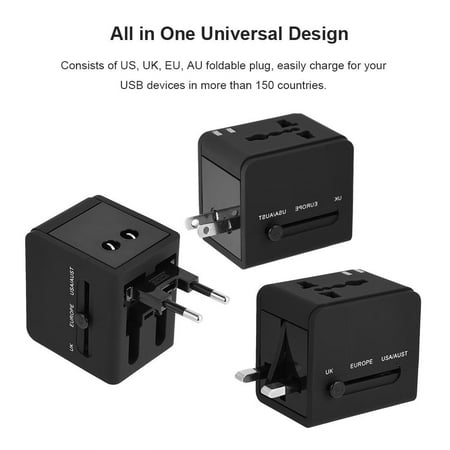
Today I will be reviewing an item that is really useful, but only once a year at most. This is an outlet converter cube. This cube takes outlets from the US, UK, EU, and AU and converts them to a USB input. In other words, you could take this cube to any of those countries and be able to charge your device through USB. This converter is great as it has so many types of outlets in it, but while traveling one would really only use one conversion as most people do not frequently travel from country to country like that. For instance, I have only used this to convert to another countries outlet once as I traveled to Spain, but it is nice to know all those options are there. This converter is also great as it offers two USB ports so it allows you to charge multiple devices at the same time. Image result for outlet converterThis feature may not be necessarily that unique to other regular charging cubes but is quite useful while traveling as you can charge someone else device at the same time as well so they don’t have to fiddle with their own converter. Though it is not is intended purpose I still find use in this charging cube as I just plug it into my walls at home to charge devices, but it is always ready to go on a trip whenever I need it. Due to the versatility of this charging cube and its options and features I would give this cube a 5/5 setting a nice standard of a quality charging cube.

Image result for outlet converter

Product Images: https://www.walmart.com/ip/Hilitand-Outlet-Converter-All-in-One-Universal-Fast-Charging-Plug-Adapter-Travel-Outlet-Converter-with-2-USB-Port/770796372

Apple AirPod Review

Among the memes and constant internet clowning of these wireless earbuds, I actually own this product. My interest peaked in this product as I sought a convenient and unintrusive way to listen to music while working out and without sacrificing too much audio quality. At the time I would work out in the bulky wireless headphones I previously reviewed, which were great for audio quality and were comfortable, but were heavy on my head and were not good for explosive movements. Overall, these headphones brought me the audio quality I desired for long workouts but were intrusive on some activities. With that said, I decided to give the Apple AirPods a chance. After numerous uses in the gym and general exercise, the AirPods turned out to be the method of listening to music while working out I was looking for. The pods are extremely light, which is the polar opposite of my previous headphones and they would not impact any of the activities I was trying to do. The only downside to using these pods is that you do have to sacrifice some audio quality as they are extremely small, and obviously are lesser in comparison to my previous option of noise canceling headphones. While I mainly was interested in these pods for gym use, they are exceptional for casual music listening around the house or other daily activities. My only gripe with the AirPods is their price. There is no reason for this product to be over $150; if anything these pods should be just over $100. Though the price is a little high, it does not impact how I feel about the actual product. 5/5

Sega Genesis Review


TECH AROUND THE HOUSE

Image result for sega genesis

For this blog, I will be reviewing the Sega Genesis which released in the US in 1989. The Sega Genesis, for those who don’t know, is a video game console that brought with it some iconic games like “Sonic the Hedgehog”. This console means a lot to me as it was all I played as a child with my dad who passed it on to me. With that said, this blog will not be very objective, not that my other posts have been necessarily bias-free. The Sega Genesis was amazing for its time, being one of the leading 16-bit home game consoles after its release, and this still carried on to when I got my hands on it in the mid-2000’s.

The Sega Genesis is home to close to 1,000 unique games offering a wide variety of game options to players. This library of games was then further expanded with the add-on to the console the Sega CD.

Image result for sega cd

The console was very adaptive as it saw technology switch from cartridges to CDs, and promptly adapted for the change.

Today, my Sega Genesis is in my room, but I am unfortunately missing cords to the console, so I stare at it and reminisce. Obviously, the technology in this console is outdated by today’s standards, but I would still give the Sega Genesis a 5/5 as it was extremely adaptive, has become a classic console that users can still enjoy today, and is just good at its intended purpose of giving people great memories of fun.


Images: 

Sega CD- https://www.google.com/url?sa=i&source=images&cd=&cad=rja&uact=8&ved=2ahUKEwj-seCxv6XeAhUDSN8KHcJSCJUQjRx6BAgBEAU&url=https%3A%2F%2Fwww.ifixit.com%2FDevice%2FSega_CD&psig=AOvVaw17gHMRZdOlXVGclcoNV-bE&ust=1540690134330770

Sega Genesis Console- https://www.google.com/url?sa=i&source=images&cd=&cad=rja&uact=8&ved=2ahUKEwiouIjfv6XeAhUMm-AKHZ65DMAQjRx6BAgBEAU&url=http%3A%2F%2Fwww.gametrog.com%2FGAMETROG%2FSEGA_Genesis_1_2_3_Information_Specs.html&psig=AOvVaw05OV5sAPwGeLApHToRFC2h&ust=1540691089918193

Mouse Review

TECH AROUND THE HOUSE

For this blog, I will be focusing on the mouse I use for my computer in my bedroom. This is the Razer Basilisk Chroma mouse, which is made by the same brand as the keyboard I previously reviewed. With that said, the light effects that applied to that keyboard also apply to this mouse as I can program the color lights on this mouse.

Image result for razer basilisk chroma mouse

A mouse is a very simple device, as it just needs to track and be responsive to your movements and clicks. I decided to buy this mouse due to its compatibility with my keyboard, and the smooth features it offers over alternative options. With the compatibility to my keyboard, there is a nice continuity created on my desk. I can match the design of the color effects, which I usually keep as one stagnant color.

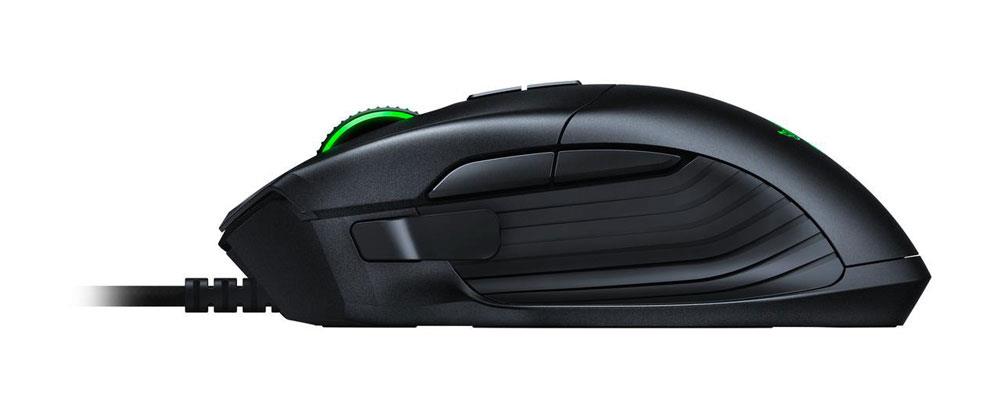
This mouse was a real seller to me due to its additional buttons and comfort. The mouse has multiple buttons on the side by the thumb, which the user can bind to whatever function they want.

Image result for razer basilisk chroma mouse

You can see there are three buttons here on the side of the mouse, which the user can decide the function. Personally, I have the larger button set as “back page” which will obviously take me to the previous page I was on. Though side buttons on a mouse are no new idea these ones are very well placed and integrated into the mouse.

The comfort of this mouse is unrivaled to me. The mouse is a great size for my hand and feels like it absorbs my hand with its curves and bends. The mouse features a thumb rest through a grippy extrusion that makes the mouse feel more like a natural extension of my hand and is great for long usage.

Image result for razer basilisk chroma mouse

Overall the mouse does its job to the fullest, and then goes above and beyond offering exceptional comfort features as well. I give this product a 5/5.

Product Link: https://www.amazon.com/RAZER-BASILISK-Removable-Customizable-Resistance/dp/B0752VK4XV/ref=sr_1_fkmr0_1?ie=UTF8&qid=1540600894&sr=8-1-fkmr0&keywords=razer+balisik+chroma

Images: https://www.jbhifi.com.au/gaming-mouse/razer-basilisk-fps-gaming-mouse/500294/

Follow Up Keyboard Blog

LIGHTING PROFILES

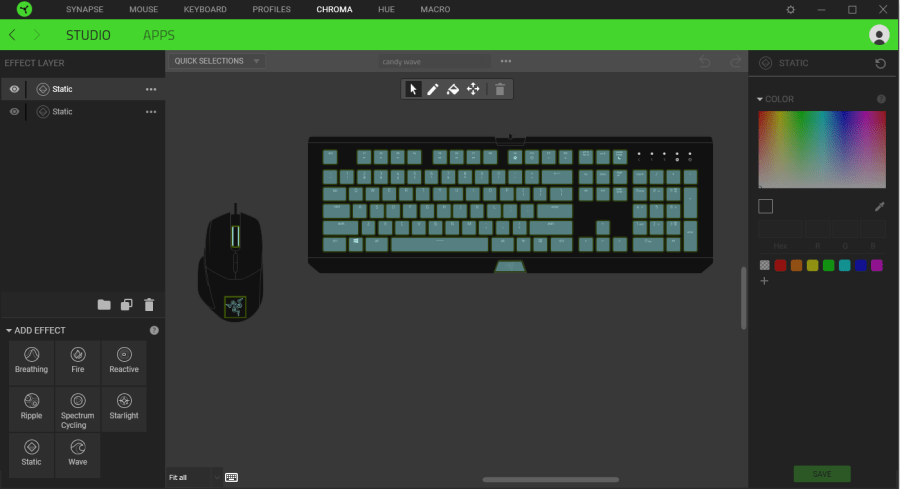
Due to some comments, many readers did not fully understand the concept of the programmable backlighting features of the Razor Blackwidow Chroma keyboard reviewed in my previous blog, so here are some pictures of lighting profiles and how the software interface works to capture the extent and value of this feature.

chroma featuresThis screenshot shows that the interface that users of this keyboard have access to that allows them to program different actions per key and of course different colors.

Image result for razer blackwidow x chroma lighting profiles ripple gif
Image (A)

Here are the different lighting effects one can assign to keys that all have a unique individual action and look.

Finally, here are a couple of examples of those effects in play, and some creative usages that users can do as well.

Image result for razer blackwidow x chroma lighting profiles gif
Image (B)
Image result for razer blackwidow x chroma lighting profiles gif
Image (C)
Image result for razer blackwidow x chroma lighting profiles pac man
Image (D)
Image result for razer blackwidow x chroma lighting profiles ripple gif
Image (E)

Keyboard Product Page: https://www.newegg.com/Product/Product.aspx?Item=9SIA4RE4T33494&cm_re=razor_black_widow_x_chroma-_-23-114-062-_-Product

Go back

Your message has been sent

Warning

Warning.

Sources: 

Image A:

https://www.google.com/url?sa=i&source=images&cd=&cad=rja&uact=8&ved=2ahUKEwj25P2BoKXeAhWGT98KHZbPCksQjRx6BAgBEAU&url=https%3A%2F%2Fthewirecutter.com%2Freviews%2Fbest-gaming-keyboards%2F&psig=AOvVaw3WkeZv8hSd-oR72jALRSzu&ust=1540681154521788

Image B:

https://www.google.com/url?sa=i&source=images&cd=&cad=rja&uact=8&ved=2ahUKEwj25P2BoKXeAhWGT98KHZbPCksQjRx6BAgBEAU&url=https%3A%2F%2Fthewirecutter.com%2Freviews%2Fbest-gaming-keyboards%2F&psig=AOvVaw3WkeZv8hSd-oR72jALRSzu&ust=1540681154521788

Image C:

https://www.google.com/url?sa=i&source=images&cd=&cad=rja&uact=8&ved=2ahUKEwig3ev2oKXeAhVEiOAKHTRqAPYQjRx6BAgBEAU&url=https%3A%2F%2Finsider.razer.com%2Findex.php%3Fthreads%2Fquestion-about-blackwidow-x-chroma.19001%2F&psig=AOvVaw32XeK96WLMY3-ljXtdCpdG&ust=1540680968189381

Image D:

https://www.google.com/url?sa=i&source=images&cd=&cad=rja&uact=8&ved=2ahUKEwjBu9XCoKXeAhXQMd8KHeFEAJkQjRx6BAgBEAU&url=https%3A%2F%2Fsteamcommunity.com%2Fsharedfiles%2Ffiledetails%2F%3Fid%3D845707680&psig=AOvVaw0UdzfH2mnLhKDPJhdX3uXz&ust=1540680266034173

Image E:

https://www.google.com/url?sa=i&source=images&cd=&cad=rja&uact=8&ved=2ahUKEwjs95-QoaXeAhXqmOAKHa8aCIYQjRx6BAgBEAU&url=https%3A%2F%2Fthewirecutter.com%2Freviews%2Fbest-gaming-keyboards%2F&psig=AOvVaw3WkeZv8hSd-oR72jALRSzu&ust=1540681154521788

Keyboard Review

TECH AROUND THE HOUSE

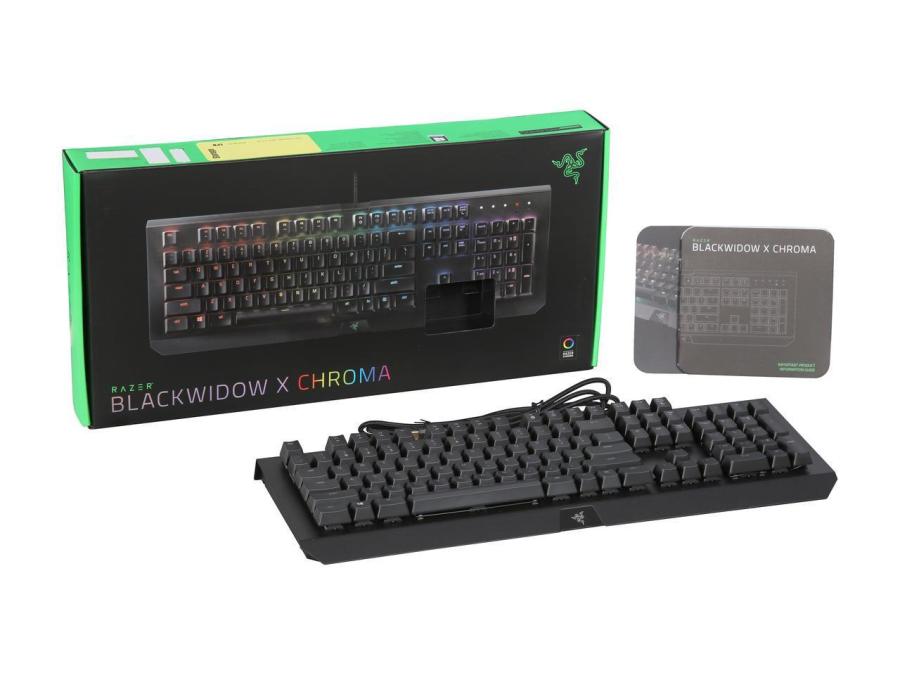
Today I am reviewing the keyboard I type on almost every day. This keyboard is the “Razor BlackWidow Chroma”, and it is definitely one of my all-time favorite keyboards for a variety of reasons. To being with, this is a mechanical keyboard with a high key height, which makes the keys feel very responsive and individual of one another. I personally type faster on mechanical keyboards, so this keyboard was a perfect fit for me.

chroma

Photo from: (https://www.newegg.com/Product/Product.aspx?item=9SIAD6H5UY9198)

Another great key feature is the durability and design of this keyboard. The majority of the keyboard is made of metal, while most keyboards are fully plastic. This metal gives the keyboard a good weight to it and creates a nice sturdy feel while in use. The keyboard is also very comfortable to use as it has adjustable height stands on the rear bottom to find the best fit for all sized hands.

Finally, this keyboard offers backlit keys, which are completely customizable to each individual key.  For instance, if I wanted to make each key a different color or brightness I could. I can also make cool effects like keys that only light up when the press and a lot more, but this does not actually add anything to the keyboard, and can often be distracting.

chromafront.jpg

Photo from: (https://www.newegg.com/Product/Product.aspx?item=9SIAD6H5UY9198)

With all that said, this keyboard is great, and I actually have no complaints, it hits all the marks for me for being mechanical, well produced/durable, and efficient. I do not see this keyboard breaking any time soon or me even getting a new one, so I give this keyboard a 5/5.

Product link: https://www.newegg.com/Product/Product.aspx?item=9SIAD6H5UY9198

Sources:

Pictures and product info from:

https://www.newegg.com/Product/Product.aspx?item=9SIAD6H5UY9198

Monitor Review

TECH AROUND THE HOUSE 9/17/2018

The world becomes more and more technologically advanced every day. It’s an obvious fact, but we are the most technologically advanced generation of humans to ever live. Everyone loves technology now, its become flashy, gimmicky, and caters to everyone like our grandparents. It seems now that every aspect of my life revolves around some sort of technology. With that said, I decided to focus this blog on reviewing the technology around my house, the technology my life revolves around.

For the first entry, I selected one of the computer monitors I use almost everyday. The monitor is made by LG and features a full HD (1920×1080) IPS display, and comes in around 27″. For those who do not know, a 27″ monitor is actually on the larger side when it comes to the average display size. This larger display allows for the a better resolution to be more easily attainable, and is great for viewing pleasure while diving into media like Netflix. Personally, I own two of these monitors, and the combined display size of both allows for me to multitask with ease and efficiency. Though I utilize two of these monitors, the large size of the display in one is great enough to multitask as well, obviously just not as efficiently.
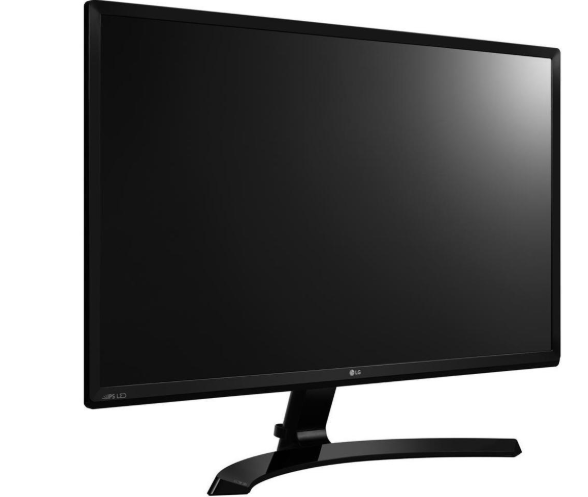
monitor front

Continuing on, aesthetically the monitor is very smooth and simple looking. There is nothing flashy going on as the color pallet consists of a matte black and a reflective black as well. These aspects bring a more professional feel to the monitor as a whole, and the simplistic stand continues this aesthetic. One great aspect of the design of this monitor is that it is extremely thin, which makes it look great on a desk and not feel bulky taking up a lot of space. moinitor side
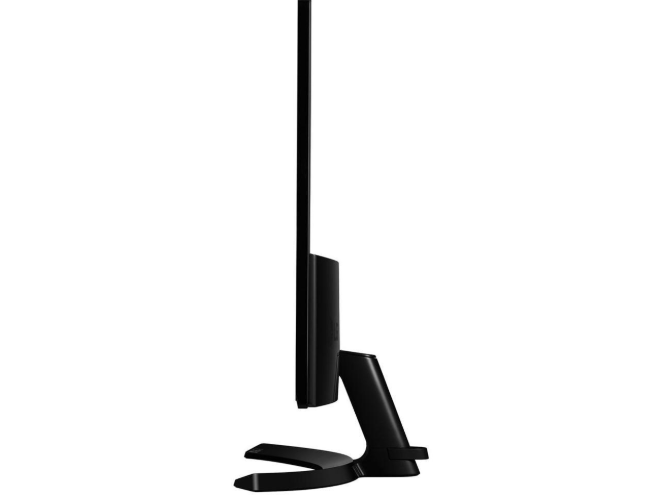
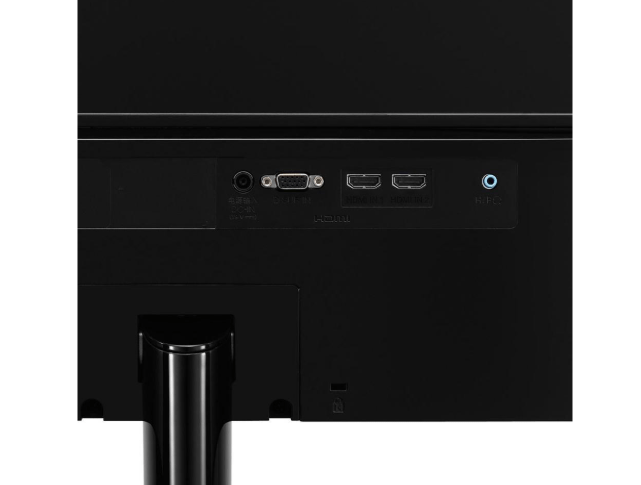
One draw back of the thinness here is that there is not an option to wall mount the monitor. To wall mount a monitor, at least 4 spaces need to be added for screw holes, which would add the depth of those holes to the width of the monitor (picture below). I would love to wall mount these monitors as it would free up more desk space and even give me more options on viewing angles of the monitor. With the absence of a wall mountable section on the back, the only extrusion is all the ports of the monitor.

screw

(Screws holes in the back of a monitor for wall mount capabilities, sourced below)
monitor back

The port section of the monitor is actually very convenient featuring 2 HDMI ports and an audio input. Having 2 HDMI ports allows you to have multiple devices available for display at the switch of the input. This feature is very common in TVs which everyone should be familiar with as an example, but in monitors especially older models, one who has multiple HDMI devices may have to buy an HDMI splitting device to be able to switch devices efficiently. The audio port comes in handy for someone trying to attach speakers for a greater audio experience, but personally the audio jack is useless to me as I run my audio through a USB device through my actual computer. There is also a VGA port, which is also useless to me as it is just an alternative display port that has worse quality than HDMI.

Overall, these LG monitors have great large display that makes computer usage efficient and smooth. Along with a pleasing user experience, these monitors are very pleasing to the eye, utilizing simplistic but stylish design. The ports are a reflection of the quality of these monitors as well,  as they provide exactly what I need for multiple device connections.

REVIEW SCORE

4.7/5   The monitor provides great multitasking abilities to get work done, and when factoring in utilizing two of these monitors I can cost through work, avoiding feeling cluttered. The wide screen keeps everything enlarged in front of me and is great for media consumption. The only hick-up in design was sacrificing wall mount ability for the slick aesthetic. 

SOURCES

-Monitor pictures from https://www.newegg.com/

-Specifically the product page: https://www.newegg.com/Product/Product.aspx?Item=9SIAC4Z64H2091&nm_mc=TEMC-RMA-Approvel&cm_mmc=TEMC-RMA-Approvel-_-Content-_-text-_-

-Monitor with wall screw holes for wall mount: https://www.bestbuy.com/site/lg-24-class-led-720p-hdtv/5734900.p?skuId=5734900&cmp=RMX&extStoreId=1480&ref=212&loc=1&gclid=Cj0KCQjwof3cBRD9ARIsAP8x70Oyi7fDOlrKrmx1IEbexDcK5D51gSMrbygi19Zdy0bZRCZyuCbNhgsaAlEaEALw_wcB&gclsrc=aw.ds